---
title: July 2026 StrongPro Feature Release
description: We have rolled out several highly requested features and performance updates to StrongPro to streamline your daily workflows and improve how you engage with your patients.
---
[Skip to content](https://help.strongroom.ai/knowledge-base-strongpro/july-strongpro-release-notes#main-content)
English
Show submenu for translations
[Submit a Support Request](https://help.strongroom.ai/knowledge-base-strongpro/kb-tickets/new?hsLang=en)

Open main navigation
Close main navigation
- English
Show submenu for translations
- [Submit a Support Request](https://help.strongroom.ai/knowledge-base-strongpro/kb-tickets/new)
- [StrongPro Login](https://enterprise.strongroom.ai/strongpro/login)
[StrongPro Login](https://enterprise.strongroom.ai/strongpro/login)
Hello. How can we help you?
- There are no suggestions because the search field is empty.
1. [StrongPro Help Centre](https://help.strongroom.ai/knowledge-base-strongpro?hsLang=en)
2. [Release Notes](https://help.strongroom.ai/knowledge-base-strongpro/release-notes?hsLang=en)
3. [Australia](https://help.strongroom.ai/knowledge-base-strongpro/release-notes?hsLang=en#australia)
# July 2026 StrongPro Feature Release
## We have rolled out several highly requested features and performance updates to StrongPro to streamline your daily workflows and improve how you engage with your patients. Here is a breakdown of what is new:
### **1. Message Replies**
You can now view and manage direct replies from your customers, making it easier to identify which patients have replied to your messages or campaigns.
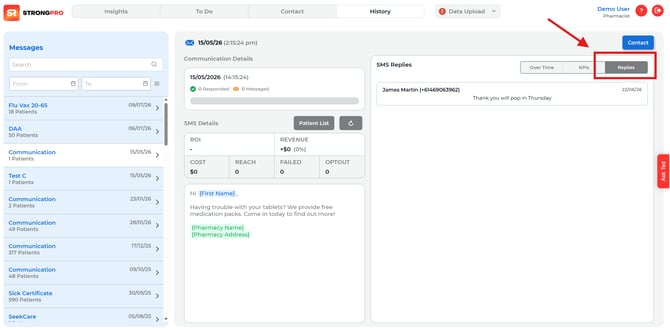
**How to use it:**
1. Access the **History** menu.
2. Open any sent message.
3. Click on **Replies** to reveal any patient responses.
### **2. AI-Powered Filter-based Cohort Creation**
Building targeted patient lists is now available. Patient cohorts can now be saved and automatically named based on your selected criteria.
**How to use it:**
1. Start in the **Contact** menu.
2. Select your desired filters to build the patient cohort.
3. Click **Save Cohort** and enter a cohort name, **OR** click the **AI icon** to automatically generate a name on your behalf.
4. Click **Save**.
### **3. Complete Custom Cohorts**
In addition to creating cohorts based on filters alone, you can now create cohorts based on specific patients. This is especially useful if you have a group of patients who do not fit a specific filter, such as nursing home patients or patients who speak only a certain language.
**How to use it:**
1. Start in the **Cohort** menu.
2. Click **+New**, enter a cohort name, and optionally choose any patient filter(s).
3. Click **Save Cohort.**
4. Go to the **Cohorts** menu and add any specific patient(s) in **Search & Add Patients**
### **4. Load Existing Cohorts**
For recurring campaigns, you can now instantly load your pre-saved cohorts, eliminating the need to rebuild your audiences from scratch.
**How to use it:**
1. Start in the **Contact** menu.
2. Click **Load Cohort…** and select your desired cohort filter.
3. Review the populated fields by referring to the filters on the left.
4. Click **Contact** to proceed.
### **5. Test User Creation**
Need to see the full picture beyond a quick preview? You can now add test users to experience firsthand exactly what your patients will receive from their StrongPro messages.
**How to use it:**
1. Start in the **Contact** menu.
2. Click **Manage Test User** button located at the top right and fill in user details.
3. Click **Add Test User**
4. The Test User(s) will appear on the **Filter Patients** for selection
**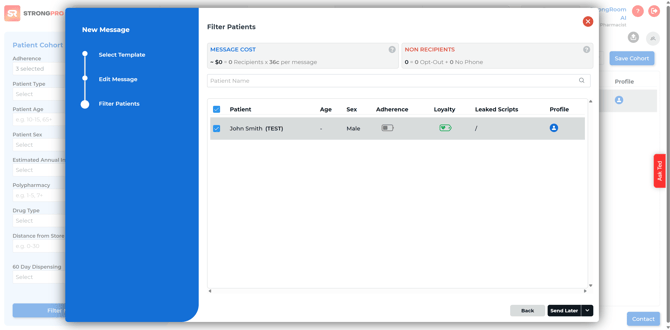**
*Please note that standard rates apply for Test Users receiving SMS messages.*
### **6. Workflow & Quality of Life Improvements**
We have squashed several bugs and optimised the overall interface to ensure a smoother, faster user experience.
- [Getting Started](https://help.strongroom.ai/knowledge-base-strongpro/getting-started?hsLang=en#main-content)
- [Campaigns](https://help.strongroom.ai/knowledge-base-strongpro/getting-started?hsLang=en#campaigns)
- [Campaigns](https://help.strongroom.ai/knowledge-base-strongpro/campaigns?hsLang=en)
- [StrongPro Tips](https://help.strongroom.ai/knowledge-base-strongpro/strongpro-tips?hsLang=en)
- [Release Notes](https://help.strongroom.ai/knowledge-base-strongpro/release-notes?hsLang=en#main-content)
- [Australia](https://help.strongroom.ai/knowledge-base-strongpro/release-notes?hsLang=en#australia)
- [FAQs](https://help.strongroom.ai/knowledge-base-strongpro/faqs?hsLang=en)
[](https://strongroom.ai)
[Download TeamViewer](https://get.teamviewer.com/strongroom)
Copyright © 2026, StrongRoom AI
```json
{
"@context" : "https://schema.org",
"@type" : "VideoObject",
"contentUrl" : "https://23583620.fs1.hubspotusercontent-na1.net/hubfs/23583620/video_assets/216775253932/inherited/web_optimized.mp4",
"dateModified" : "2026-07-09T04:11:35.686Z",
"duration" : "PT33S",
"height" : 1888,
"name" : "cohort creation",
"thumbnailUrl" : "https://23583620.fs1.hubspotusercontent-na1.net/hubfs/23583620/cohort%20creation.mp4/medium.jpg",
"uploadDate" : "2026-07-09T04:11:24.603Z",
"width" : 3838
}
```
```json
{
"@context" : "https://schema.org",
"@type" : "VideoObject",
"contentUrl" : "https://23583620.fs1.hubspotusercontent-na1.net/hubfs/23583620/video_assets/218392567146/inherited/web_optimized.mp4",
"dateModified" : "2026-07-30T23:05:43.945Z",
"duration" : "PT36S",
"height" : 1892,
"name" : "custom cohort group creation",
"thumbnailUrl" : "https://23583620.fs1.hubspotusercontent-na1.net/hubfs/23583620/custom%20cohort%20group%20creation.mp4/medium.jpg",
"uploadDate" : "2026-07-30T23:05:35.702Z",
"width" : 3838
}
```
```json
{
"@context" : "https://schema.org",
"@type" : "VideoObject",
"contentUrl" : "https://23583620.fs1.hubspotusercontent-na1.net/hubfs/23583620/video_assets/216775214854/inherited/web_optimized.mp4",
"dateModified" : "2026-07-09T04:11:37.192Z",
"duration" : "PT12S",
"height" : 1888,
"name" : "loading cohorts",
"thumbnailUrl" : "https://23583620.fs1.hubspotusercontent-na1.net/hubfs/23583620/loading%20cohorts.mp4/medium.jpg",
"uploadDate" : "2026-07-09T04:11:30.696Z",
"width" : 3832
}
```
```json
{
"@context" : "https://schema.org",
"@type" : "VideoObject",
"contentUrl" : "https://23583620.fs1.hubspotusercontent-na1.net/hubfs/23583620/video_assets/218392624236/inherited/web_optimized.mp4",
"dateModified" : "2026-07-30T23:34:26.141Z",
"duration" : "PT29S",
"height" : 1900,
"name" : "creation of test users",
"thumbnailUrl" : "https://23583620.fs1.hubspotusercontent-na1.net/hubfs/23583620/creation%20of%20test%20users.mp4/medium.jpg",
"uploadDate" : "2026-07-30T23:34:16.992Z",
"width" : 3834
}
```